
Review your workflow
Test drawing setup, shared measurement and reporting against a real job.
Measure PDF plans, build repeatable scopes and work from one shared project. We help Australian teams assess zzTakeoff, set up their workflow and train with real drawings.
Distributed and supported by Takeoff & Estimating
Test drawing setup, shared measurement and reporting against a real job.
Build confidence measuring drawings and organising takeoff in zzTakeoff.
Set up templates, assemblies and pricing around the work you estimate.
Learn a clear path from drawings to checked quantities.
Organise projects, responsibilities and review.
Comparing PlanSwift and zzTakeoff? Start with your workflow.
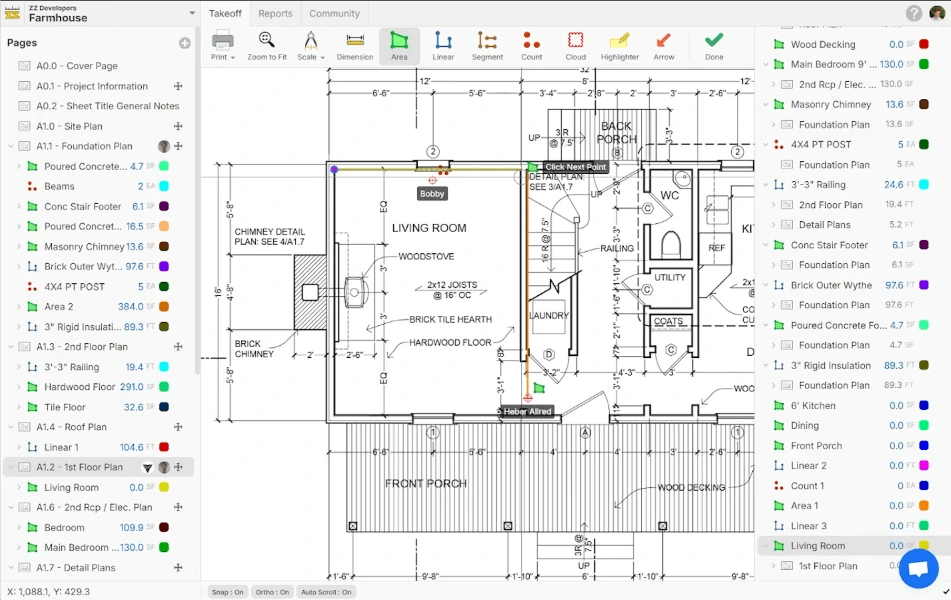
Start with digital measurement, then connect quantities to shared scopes, reusable assemblies and reports.
Use area, linear, segment and count tools on PDF drawings, with snapping, orthogonal drawing and area cutouts.
More than one estimator can work in the same project and takeoff. See updates as they happen and agree who owns each scope.
AI-assisted page naming and scale setup can reduce drawing preparation. Check names and scale against the issued plans before measuring.
Share templates and assemblies with your team, then add formulas and pricing for material, labour and plant quantities.
Use takeoff and item reports to check quantities and costs. Export to Excel or PDF for estimating and bid handover.
Dev Tools support custom reports, dashboards and plugins. MCP can connect compatible AI tools where available in your plan.
See how to measure and review a drawing in zzTakeoff.
Bring one familiar drawing set to a demonstration and test the measurements, assumptions and report your team needs.
Measure across trades, organise bid packages and keep a shared view of each scope.
Take off slabs, footings and walls, then reuse assemblies and pricing on the next job.
Measure walls, ceilings and floor finishes while keeping product and waste assumptions visible.
Count fixtures and symbols, measure runs and revisit quantities when the drawings change.
A useful fit for estimating teams, quantity surveyors and trade contractors who want collaborative takeoff without tying work to one desktop.
Let’s discuss your workflowYes. We support existing users as well as new customers. Tell us about your current setup and what you’d like to improve.
Yes. zzTakeoff supports simultaneous work in the same project and takeoff. Agree scope ownership and review responsibilities before dividing the job.
Not necessarily. Import support does not mean every formula or assembly transfers unchanged. See our migration checklist and test a sample first.
No. Keep a review step for page names, scale, measured quantities and scope. We can help your team establish a repeatable checking process.
Yes. We can review how you currently measure and organise jobs, then discuss a practical transition and training plan.
We start with your drawings, team structure and current workflow. A demonstration can help you assess collaboration and takeoff features before choosing software.
Let’s talk about your software, your team and what you’d like to improve.
Talk to our team1300 818 620